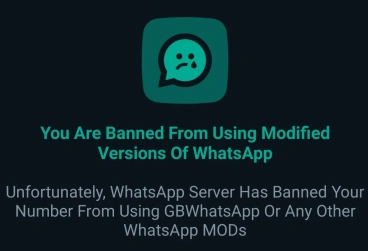
If you have searched for GB WhatsApp, you have probably seen versions advertised as "Anti-Ban." The name sounds reassuring, but it is important to understand what it actually means before relying on it.
An anti-ban feature may be designed to reduce the chances of GB WhatsApp being detected or restricted, but it cannot guarantee that your WhatsApp account will never be banned. WhatsApp itself warns that unofficial apps can lead to temporary or permanent account restrictions.
If your account has already been restricted, the steps below are more useful than simply installing another APK and hoping the problem disappears.
What Does "Anti-Ban" Mean in GB WhatsApp?
"Anti-ban" is generally used to describe modifications intended to make a WhatsApp MOD less likely to trigger account restrictions. You may see the term included in GB WhatsApp version descriptions or update notes.
However, anti-ban does not mean ban-proof. There is no GB WhatsApp version that can guarantee permanent protection for every account. WhatsApp can change how it detects unofficial clients, so a version that works without problems today may not work the same way after a future WhatsApp update.
This is also why you should be careful with claims such as "100% Anti-Ban," "Permanent Anti-Ban," or "No Ban Guaranteed." Those are claims made by distributors, not guarantees provided by WhatsApp.
Does GB WhatsApp Anti-Ban Really Prevent Bans?
Not reliably.
An anti-ban feature may reduce certain detection-related problems, but it cannot remove the underlying risk of using an unofficial WhatsApp client. WhatsApp's own help information states that unofficial apps can result in temporary or permanent bans and other account restrictions.
There is another important point: not every restriction is necessarily caused by the same thing. WhatsApp also restricts accounts for activity associated with spam, automated messaging, or bulk messaging. During a restriction, users may be unable to start chats with new contacts, create groups, add members, or use linked devices.
So installing an APK advertised as "anti-ban" is not a reliable solution if your account is already being flagged.
Why Can GB WhatsApp Users Still Get Banned?
There are several possible situations:
Using an unofficial client: WhatsApp specifically identifies unofficial versions as a reason an account may receive a temporary ban.
Spam or bulk activity: Sending the same message to many people, using automated messaging, or performing large numbers of actions in a short period can trigger restrictions. WhatsApp says accounts involved in spam, automation, or bulk messaging may be banned.
Repeated restrictions: If an account repeatedly returns to the same behavior after a restriction, changing to another GB WhatsApp version does not guarantee that the account will remain unrestricted.
Detection changes: WhatsApp can change its systems over time. This means an older MOD version that previously worked may suddenly start showing an unofficial-app warning or login problem.
What Should I Do If GB WhatsApp Is Temporarily Banned?
If you see "Temporarily banned", don't immediately download another random GB WhatsApp APK.
First, check the exact message shown in the app. WhatsApp's guidance for a temporary ban related to an unofficial version is to switch to the official WhatsApp app. The company warns that continuing to use the unofficial version can lead to a permanent ban.
A practical approach is:
- Stop using the modified app.
- Do not keep switching between different MOD versions.
- If WhatsApp gives you a review option, use it.
- Install the official WhatsApp app if the restriction is related to the unofficial client.
- Register your phone number again and follow the instructions shown by WhatsApp.
- If you have an important chat history, check your available backup before removing anything.
Do not assume that waiting for the restriction to disappear means the underlying problem has been fixed.
What If WhatsApp Says "You Need the Official WhatsApp to Log In"?
This message is different from simply having a connection problem.
WhatsApp says users of unofficial apps may see messages such as "You need the official WhatsApp to log in" or that they have been logged out for using an unofficial app.
In this situation, repeatedly reinstalling GB WhatsApp is unlikely to solve the underlying issue. The practical next step is to remove the unofficial app and move to the official WhatsApp application.
If you are worried about your chats, do not uninstall everything immediately without checking your backup situation first. WhatsApp also warns that it cannot guarantee successful chat-history transfer from an unofficial app.
Temporary Ban vs Permanent Ban
| Message or Situation | What It Means | What to Do |
|---|---|---|
| Temporarily banned | Your account has a temporary restriction. | Follow the in-app instructions and switch to the official app if the restriction is related to an unofficial version. |
| Your account is restricted | Some WhatsApp functions may be temporarily unavailable. | Wait for the restriction period and avoid spam, automation, or bulk messaging. |
| You need the official WhatsApp to log in | WhatsApp has identified the use of an unofficial client. | Remove the MOD and install the official WhatsApp app. |
| This account can't use WhatsApp | The account has been blocked from using WhatsApp. | Use the available review/appeal option if one is provided. |
Is There a 100% Anti-Ban GB WhatsApp Version?
No version should be treated as 100% anti-ban.
If a website claims that a particular GB WhatsApp APK can guarantee that your account will never be banned, treat that claim cautiously. WhatsApp does not provide an official "anti-ban" certification for modified apps, and its current guidance explicitly says unofficial apps can result in account restrictions or bans.
The safest option for protecting an important WhatsApp account is the official app.
How to Reduce the Risk of Account Restrictions
If you still decide to use a WhatsApp MOD, avoid behaviors that can create additional problems for your account.
- Don't send the same message to large numbers of people.
- Avoid automated or bulk messaging tools.
- Don't repeatedly switch between different MOD versions.
- Keep important chats backed up where possible.
- Don't trust APK pages that promise guaranteed anti-ban protection.
- If WhatsApp displays an unofficial-app warning, take it seriously rather than repeatedly trying to log in.
These steps cannot make GB WhatsApp risk-free, but they can help you avoid adding spam or automation-related issues on top of the risks associated with using an unofficial client.
Final Takeaway
GB WhatsApp Anti-Ban is not a guarantee that your account cannot be restricted. It may be advertised as a way to reduce detection or ban problems, but WhatsApp can still restrict accounts using unofficial clients.
If you have not been banned yet, understand the risk before switching. If you have already received a temporary ban or an official-app warning, the practical solution is not to keep testing different APKs. It is to follow WhatsApp's instructions and consider moving back to the official app.